 AccPilot
The bank statement is the checklist.
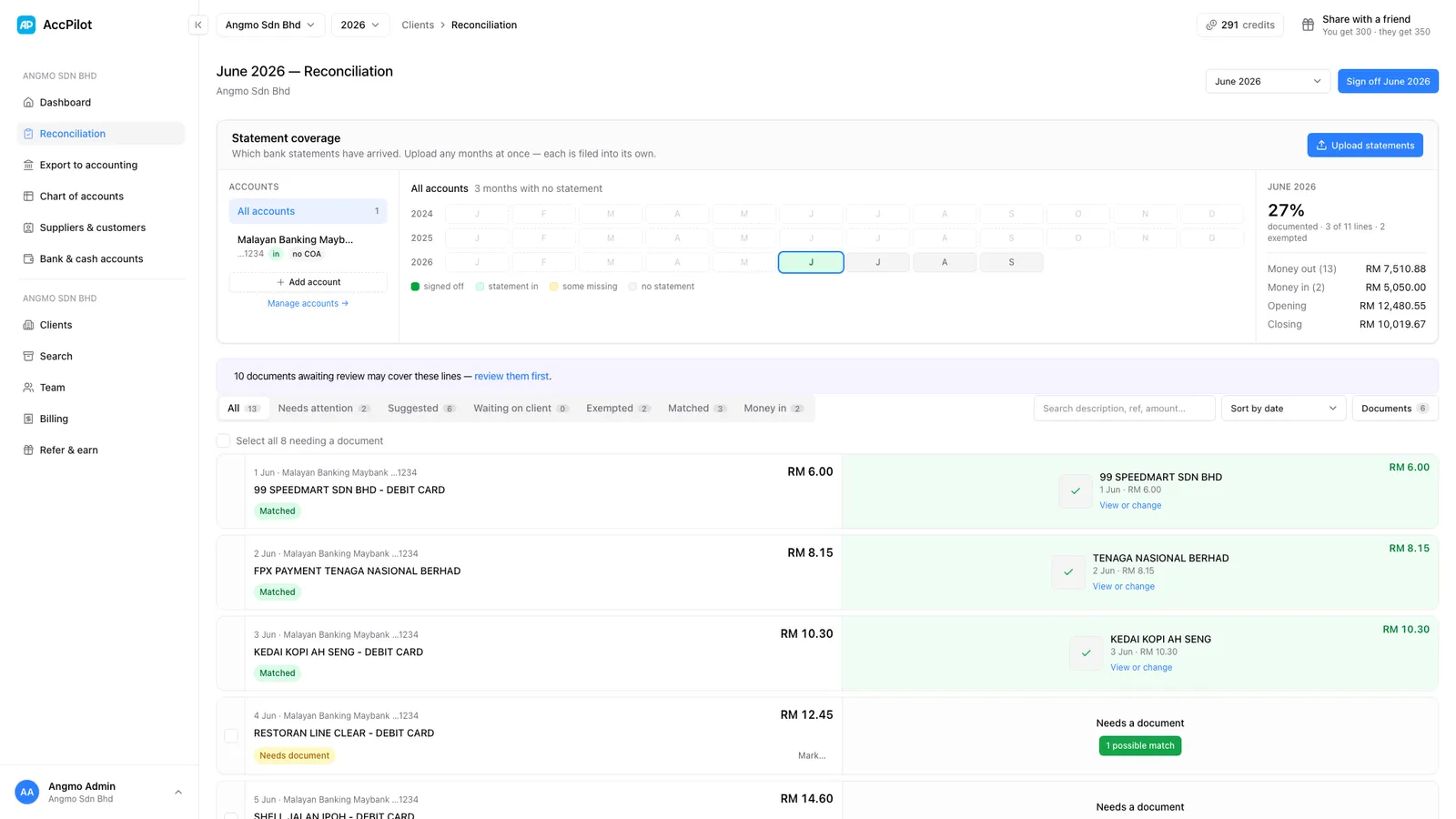
Upload the client’s bank statement with their receipts. AccPilot reads every line, matches it to the document that covers it, and shows you the lines still missing a receipt, so you ask the client once, with dates and amounts.
Why match from the bank statement?
A bag of receipts only tells you what the client remembered to keep. The bank statement tells you what was actually paid. Every payment out of the business account should have a document behind it, so the statement is the list to work from. The lines with nothing behind them are the receipts you still need.
Done by hand, that means ticking each line against a pile of paper, writing a list of what’s left, and messaging the client. Then doing it again next month. The method is in our bank reconciliation statement guide.
How does AccPilot match statement lines to receipts?
Each statement line is matched only to a document with exactly the same amount, dated close to the payment. The date, the supplier’s name, a reference number and how similar lines were matched before decide which document it is. Clear matches are made for you; the rest are suggested for your staff to confirm.
- Statements in as PDF or a photo. AccPilot reads each line: date, description, reference, amount and balance.
- The amount must match exactly. A line is only matched to a document with the same amount, dated close to the payment. Amount alone is never enough. The date, the supplier’s name, a reference number on both, and how the same description was matched before all count.
- Sure matches are made for you; the rest are suggested. When there is exactly one clear candidate, the line is matched. When it is less certain, the best candidate is suggested for your staff to confirm or reject. You can always link a document by hand.
- One payment, several invoices. Where a client paid a supplier once for several bills, AccPilot can suggest the set of invoices that add up to the payment.
- Every line gets a status. Matched, partially matched, needs a document, money in, or a transfer between the client’s own accounts. Your staff can also mark a line as not needing a document, accepted without one, or ignored.
Statement coverage at a glance
A calendar for each client shows which months have a statement in, which are signed off, and which are still missing, going back years if you need. A completeness figure tracks how much of each month is documented, and you sign the month off when it is done.
How do you ask the client for the missing receipts?
Tick the lines that need a receipt and add a short note to each if you like (“Shell, 14 March, RM86.40, petrol or toll?”). Missing statements for the month go in the same request. AccPilot warns you if a line already has a suggested match, so you don’t ask for something you have.
AccPilot writes the message with one link in it. Copy it and send it the way you already talk to the client. The client opens the link without logging in and uploads the receipt against each line, or says “I don’t have this” with a comment. The link lasts 14 days and renews when you send it again. As the receipts come in, they are read and matched like any other document.
For more on getting receipts in monthly instead of yearly, see how to get client receipts without the monthly chase.
What you get out
- The matched documents go into the posting Excel with their statement line beside them. See what the Excel export contains.
- The statement itself exports as its own workbook: every bank line with its status, and the documents matched to it.
What stays with your firm?
What an unexplained transfer was, whether a payment is business or personal, what to do about a line the client says has no receipt. AccPilot does the ticking and the list-making; the judgement is still yours. Bank matching is included in every plan.
More on how AccPilot works
- AccPilot for accounting firmsWhat changes in a firm’s month, from the bag of receipts to the 7-year archive.
- Receipts to one clean ExcelWhat the export looks like and how it goes into any accounting software.
- PricingPlans by credit volume, monthly or yearly, one credit per receipt, pooled across the firm.
See it on one of your clients’ statements.
Bring a month’s statement and the receipts you have. We’ll show you what is missing. No obligation.
Book a free demo