 AccPilot
Receipts in. One clean Excel out.
AccPilot reads every receipt, invoice and bill, your staff check and approve them, and the firm downloads one Excel workbook that imports into whatever accounting software you run. No integration to set up, no package to change.
Why does AccPilot export Excel instead of posting directly?
Every firm in Malaysia runs a different accounting package, often more than one, and many are desktop software. AccPilot does not plug into any of them, and it does not post into your books by itself. It gives you one self-describing Excel file, and you import it the way you already import a spreadsheet. If you change software one day, nothing about AccPilot changes.
What does the AccPilot Excel export contain?
Each export is one workbook with three sheets: Postings, one row per approved document with its account, supplier, date, amount and matched bank line; Line Items, one row per printed line; and Legend, a plain-English note on what every column means.
1. Postings: one row per document
| Column | What it holds |
|---|---|
| Payment Account | The bank or cash account the document was paid from |
| Account Code / Account Name | The expense or income account it is posted to |
| Date | The document date, as a real Excel date |
| Supplier / Supplier Code | Who it was from (on a sales export, the customer) |
| Document Ref | The invoice or receipt number as printed |
| Description | What it was for |
| Currency / Total | The amount, to two decimals |
| Foreign Currency / Foreign Currency Total | Filled in when the document was in another currency |
| Statement Line / Matched Amount | The bank statement line it was matched to, if any |
| AccPilot Ref / File | The reference that finds the document again in AccPilot, and its file name |
Rows are sorted by payment account, then account code, then date, so each bank or cash account’s entries sit together.
2. Line Items: one row per printed line
For receipts and invoices with several lines, each line gets its own row: AccPilot Ref, Document Ref, Date, Supplier, Line, Description, Quantity, Amount, Currency, Account Code. The AccPilot Ref ties each line back to its document on the Postings sheet.
3. Legend: what every column means
A plain-English explanation of each column, so whoever sets up the import, or the auditor looking at the file later, does not have to guess.
How does a batch go from receipt to your books?
- Documents come in by web upload (up to 50 files at a time), phone snap, email, or the upload link you send the client.
- AccPilot reads them: vendor, date, amounts, tax and line items, with a suggested account. Each one is marked Ready, or Check with the reason.
- Your staff check and approve. Only approved documents can be exported. A document that fails a check is left out of the file, so a half-read receipt never reaches the books.
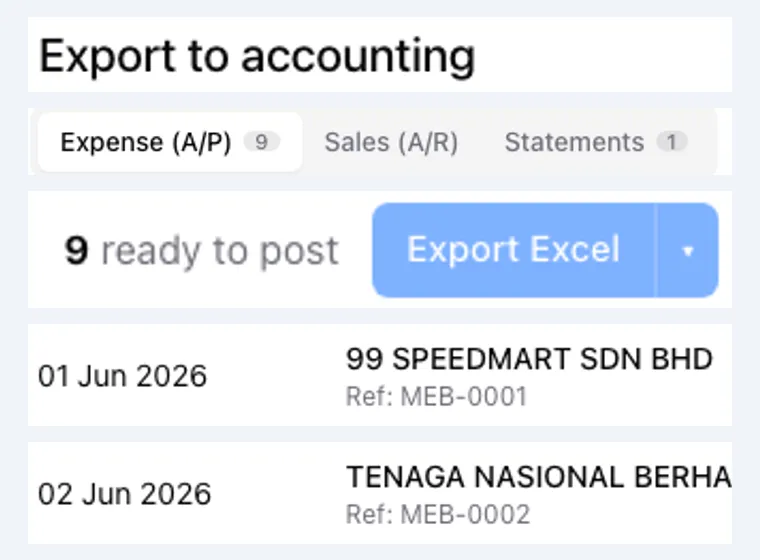
- Export. On the client’s export page, choose expenses or sales, pick a month if you want one, tick the documents and press Export Excel.
- Import the file into your accounting software.
- Mark as posted. Tell AccPilot how many rows went in. It must equal the number of documents in the batch, so nothing is posted twice or left behind. If something went wrong, revert the batch and the documents go back to approved.
Bank statements have their own export
The statement lines and their matches export as a separate workbook, with every bank line, its status and the document matched to it. See bank statement matching.
What happens to the receipts after the export?
The documents stay in AccPilot, searchable by vendor, date, amount or document number for 7 years, and the AccPilot Ref in your books leads straight back to each one. Keep the paper originals in one envelope a month; the glue and the photostat can stop. More in how long to keep receipts in Malaysia and what keying receipts really costs your firm.
More on how AccPilot works
- AccPilot for accounting firmsWhat changes in a firm’s month, from the bag of receipts to the 7-year archive.
- Bank statement matchingStatement lines matched to documents, and the chase list for what is missing.
- PricingPlans by credit volume, monthly or yearly, one credit per receipt, pooled across the firm.
See the export built from your own receipts.
Bring a client’s receipts to the demo and take the Excel home with you. No obligation.
Book a free demo