 AccPilot
Payment voucher template (free Excel) and how to fill it in
Free payment voucher template in Excel, ready to print. What a payment voucher is, what to write on it, and a worked RM example.
A client’s bank statement shows a transfer of RM4,500 to a supplier on the 12th. The firm asks what it was for. The client says “the invoice, lah”, but which invoice? There were three that month, one credit note, and nothing written down to say which were paid.
That is the gap a payment voucher fills. It is a single sheet that says: this payment, to this payee, for these invoices, approved by this person. Clipped to the invoices, it turns a bank line into something the firm can post without phoning the client.
Plenty of small clients skip it. The firm pays for that later, in chasing, guessing and sorting at year-end.
Free payment voucher template (Excel)
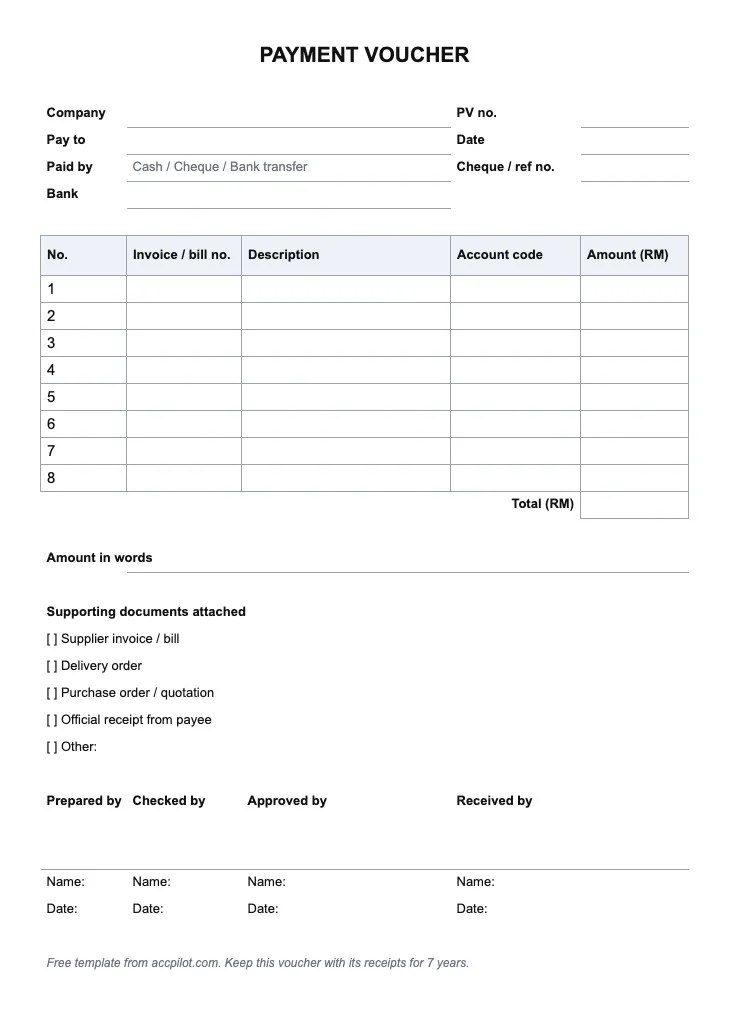
Download the payment voucher template (Excel). One page, ready to print or fill in on screen. The rest of this guide explains each part.
What a payment voucher is
A payment voucher (PV) is the business’s own internal record that a payment was made and approved. It is prepared by the business paying out, usually for payments by cheque or bank transfer, and filed together with the supporting documents.
It is easy to confuse with the other documents in the same file:
| Document | Who prepares it | What it shows |
|---|---|---|
| Invoice | The supplier | What the business owes |
| Receipt | The supplier, or whoever was paid | That they received the money |
| Payment voucher | The business paying | That it paid, what for, and who approved it |
| Petty cash voucher | The business paying | One small cash payment out of the petty cash tin |
For small cash spending, use a petty cash voucher instead. Payment vouchers are for payments through the bank.
Why it’s worth the extra sheet
- It links the bank line to the invoices. One transfer often settles several invoices, less a credit note. The voucher lists them, so nobody has to guess.
- It shows approval. A second signature before money goes out is one of the simplest controls a small business can have.
- It stops double payments. Invoices listed on a voucher are marked paid. The same invoice can’t quietly be paid again next month.
- It covers payments with no invoice. Deposits, refunds to customers, director’s claims. The voucher records what the payment was, and who approved it.
It does not replace the invoice. The voucher says the business paid; the supplier’s invoice and receipt are still the evidence of what was bought. Keep them together.
What goes on a payment voucher
- Date of the payment
- Voucher number, in sequence (PV-0001, PV-0002 …)
- Payee: the supplier or person paid
- Description: the invoice numbers and dates being paid, or what the payment is for
- Amount in RM, and the payment method (cheque number or transfer reference)
- Account the payment is posted to, such as trade payables or a specific expense
- Receipt or invoice attached: yes or no
- Signatures: prepared by, approved by, received by (the payee signs if paid in person or by cheque collected at the office)
Download the payment voucher template (Excel). It has these fields on one page, ready to print or fill in on screen.
Filling one in, step by step
- Start from the invoices. Pull the supplier invoices due, and any credit notes from the same supplier.
- Work out the amount. Total the invoices, deduct credit notes. This is the figure that will go out of the bank.
- Prepare the voucher. List each invoice and credit note in the description, with the net amount and the account.
- Get it approved. Someone other than the preparer signs before the payment is made.
- Make the payment. Write the cheque number or transfer reference on the voucher.
- Attach everything. Invoices, credit notes, the bank transfer slip or cheque stub. Stamp the invoices “paid” with the PV number.
- File by voucher number. In sequence, so a gap shows. Keep them for 7 years: section 82 of the Income Tax Act 1967 requires sufficient records for that long, and LHDN sets out what that means in its public rulings, such as Public Ruling 4/2000 for companies.
A worked example
A made-up client pays its stationery supplier on 12 October 2026. Outstanding with that supplier:
| Document | Date | RM |
|---|---|---|
| Invoice INV-2201 | 2 September | 3,450.00 |
| Invoice INV-2215 | 18 September | 1,280.50 |
| Credit note CN-0087 (damaged goods returned) | 25 September | (230.50) |
| Net to pay | 4,500.00 |
The voucher, PV-0342, reads:
- Payee: the supplier
- Description: Payment of INV-2201 and INV-2215, less CN-0087
- Amount: RM4,500.00, online transfer, reference on the voucher
- Account: Trade payables
- Invoices attached: yes
- Prepared by the account clerk, approved by the director
On the bank statement the firm sees one line: RM4,500.00 out on 12 October. With PV-0342 in the file, that line explains itself. Two invoices and a credit note clear from the supplier’s account, and nothing is left open by mistake.
Without the voucher, the firm sees RM4,500, finds invoices of RM3,450.00 and RM1,280.50, and neither matches. Somebody spends twenty minutes working out that a credit note was deducted. Multiply that by every supplier, every month.
Common problems the firm sees
- No voucher at all. Only the bank line. The firm has to guess which invoices were paid.
- Voucher with no invoice. “Payment to supplier, RM4,500”, nothing attached. It proves money went out, not what it was for.
- Same person prepares and approves. Fine for a one-person business; anywhere else, ask for a second signature.
- Vouchers written up at year-end. From memory, in one sitting. The details are often wrong.
- Invoices not marked paid. The same invoice turns up in next month’s payment run.
Where AccPilot fits
AccPilot does not create payment vouchers or run approvals. That stays with the client. What it does is the part the firm spends its time on: the documents behind the payments, and the bank lines that have none.
The client or the firm uploads the supplier invoices, credit notes and receipts (web upload, phone snap, email, or the client upload link). AccPilot reads the supplier, date, amounts, tax and line items, and marks each document Ready or Check with the reason. Upload the bank statement too, and AccPilot matches statement lines to documents. A payment with no invoice behind it ends up on the chase list, with its date and amount, ready to send the client. Everything exports as one Excel for your accounting software, and stays searchable by vendor, date and amount for 7 years. More on the matching in the bank reconciliation guide.
To see it on one of your clients’ supplier invoices and bank statements, book a free demo.